

In case you missed it, Formie 4 is full-steam ahead, and we've been smashing out new features.
If you want to jump straight in, check out the Formie 4 Beta upgrade guide for install steps, and migration notes.
How The Beta Train Works
Rather than one enormous pre-release and a surprise launch day, Formie 4 ships in themed beta chunks. Each public beta usually covers two or three related areas — enough to test properly, without turning the blog into a semver changelog.
Beta 1 was migration-first. Betas 2 through 7 have been about making the form builder, submission workflows, field options, uploads, integrations, security, and reporting top-notch.
Beta 3 — Organise The Builder
Beta 3 was really about improving the control panel behaviour of forms and the form builder.
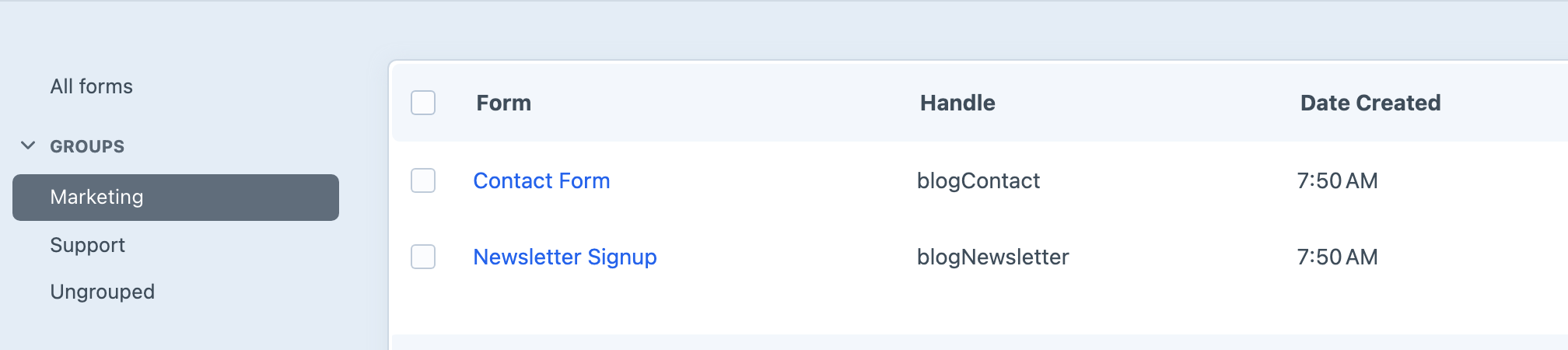
Form Groups And Defaults
If you manage more than a handful of forms, sidebar organisation matters. Form Groups give you filters in the forms index, a sensible place to create new forms, and — in later betas — optional group-level policies for defaults and restrictions.
Settings → Defaults is the other half of the story. Set form, field, notification, and validation defaults once, and new forms inherit them automatically instead of starting from a blank slate every time.
Field Palette, Stencils, And Preview
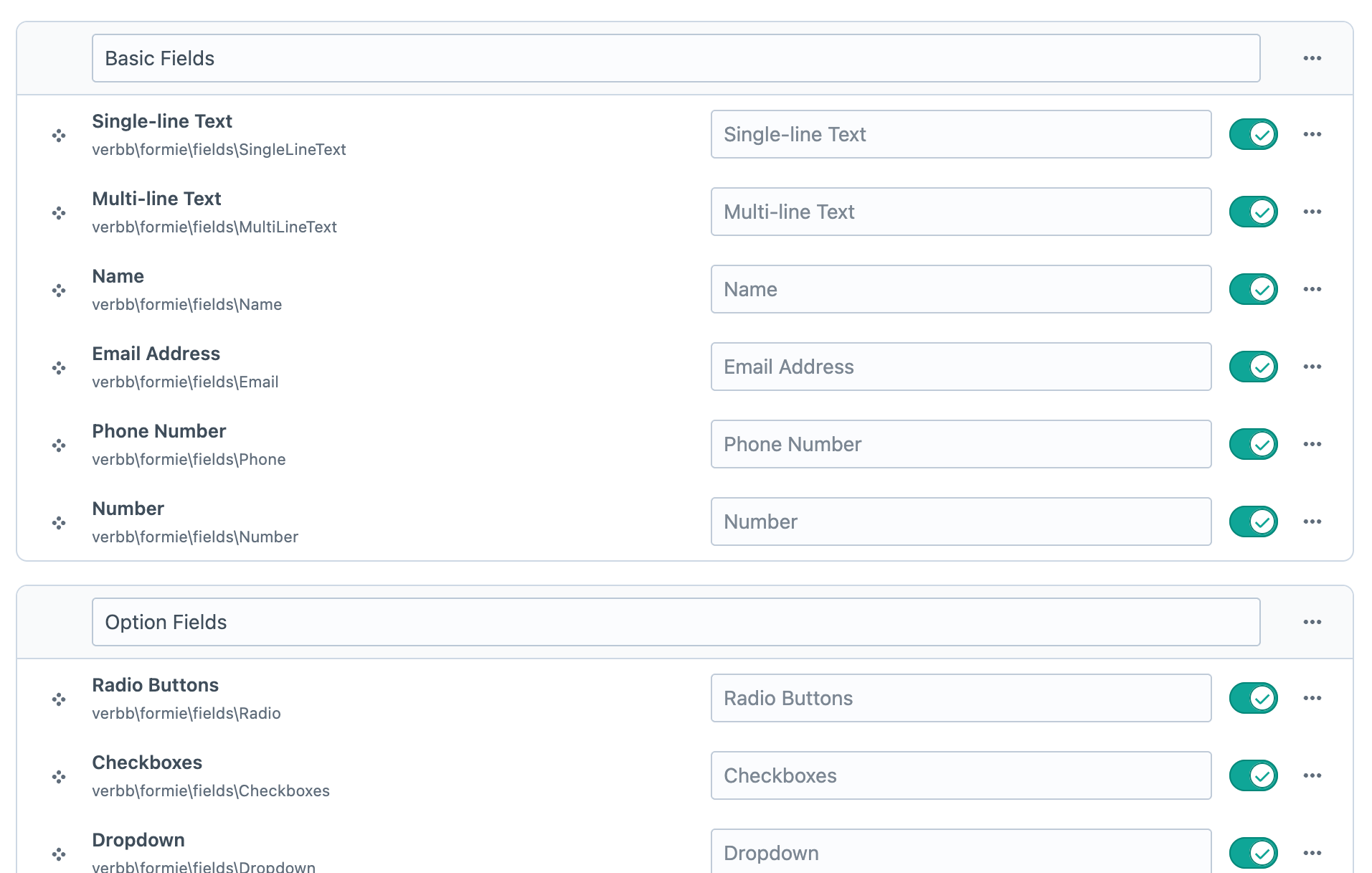
The old "disable field types globally" checkboxes are gone. The Field Palette is a drag-and-drop editor for grouping and enabling field types — much closer to how you'd actually want to curate a builder for content editors.
Stencils also got a proper home under Formie → Stencils, and a clearer split between who owns what:
- Project stencils — shipped in project config, ideal for developers defining starter forms that deploy with your codebase across environments
- Editable stencils — created and managed in the control panel by content editors, without touching YAML or waiting on a deploy
On production (allowAdminChanges = false), project stencils are read-only with a Save a copy path when an editor needs their own variant. Synced fields in stencils preserve shared definition links when creating new forms.
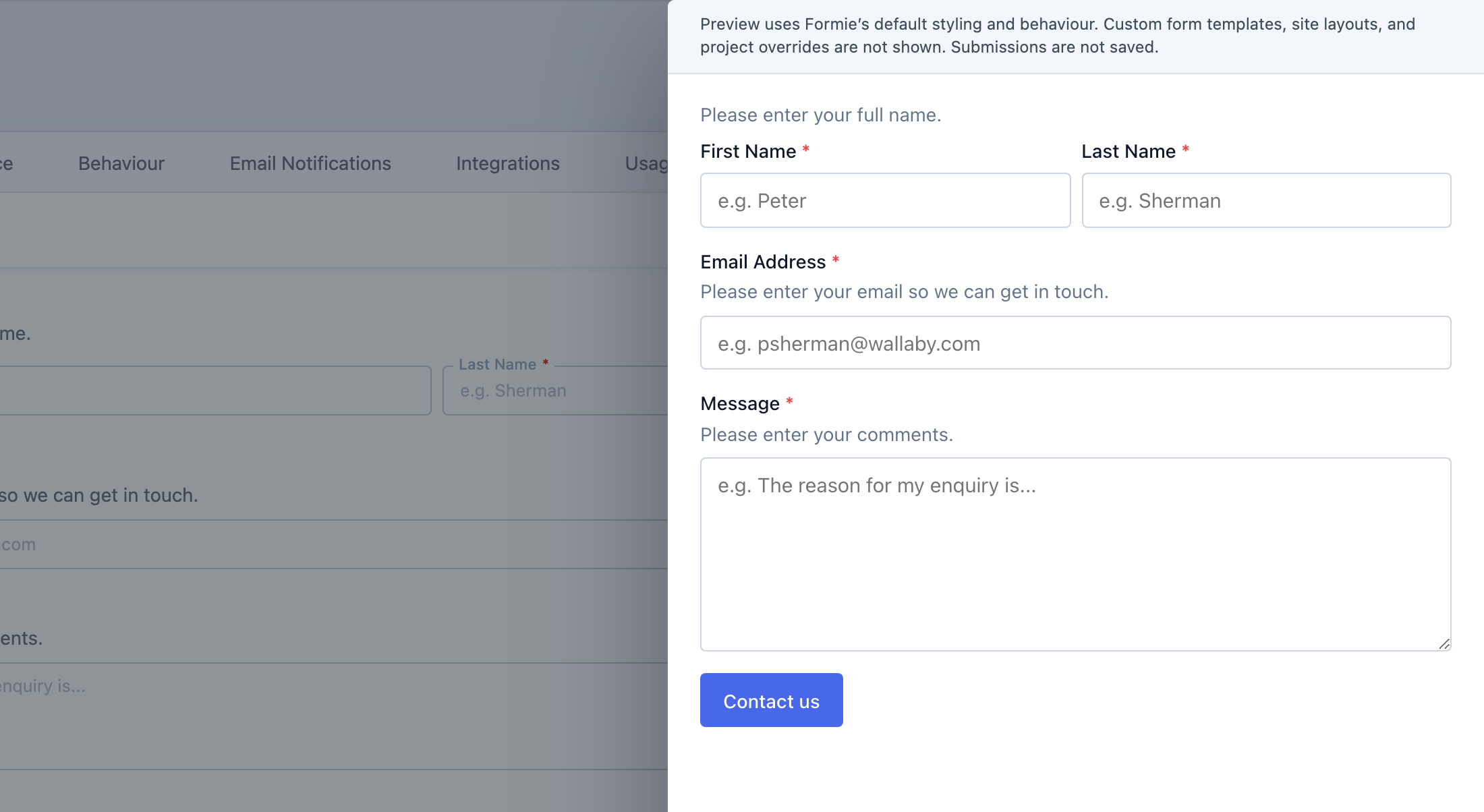
And if you've ever saved a form twelve times just to check what it looks like on the front end, the Form Preview slide-out in the builder is for you.
Beta 4 — Smarter Submission Workflows
Beta 4 focused on what happens after someone clicks submit — or what they see when validation fails.
Status Conditions And Redirect Rules
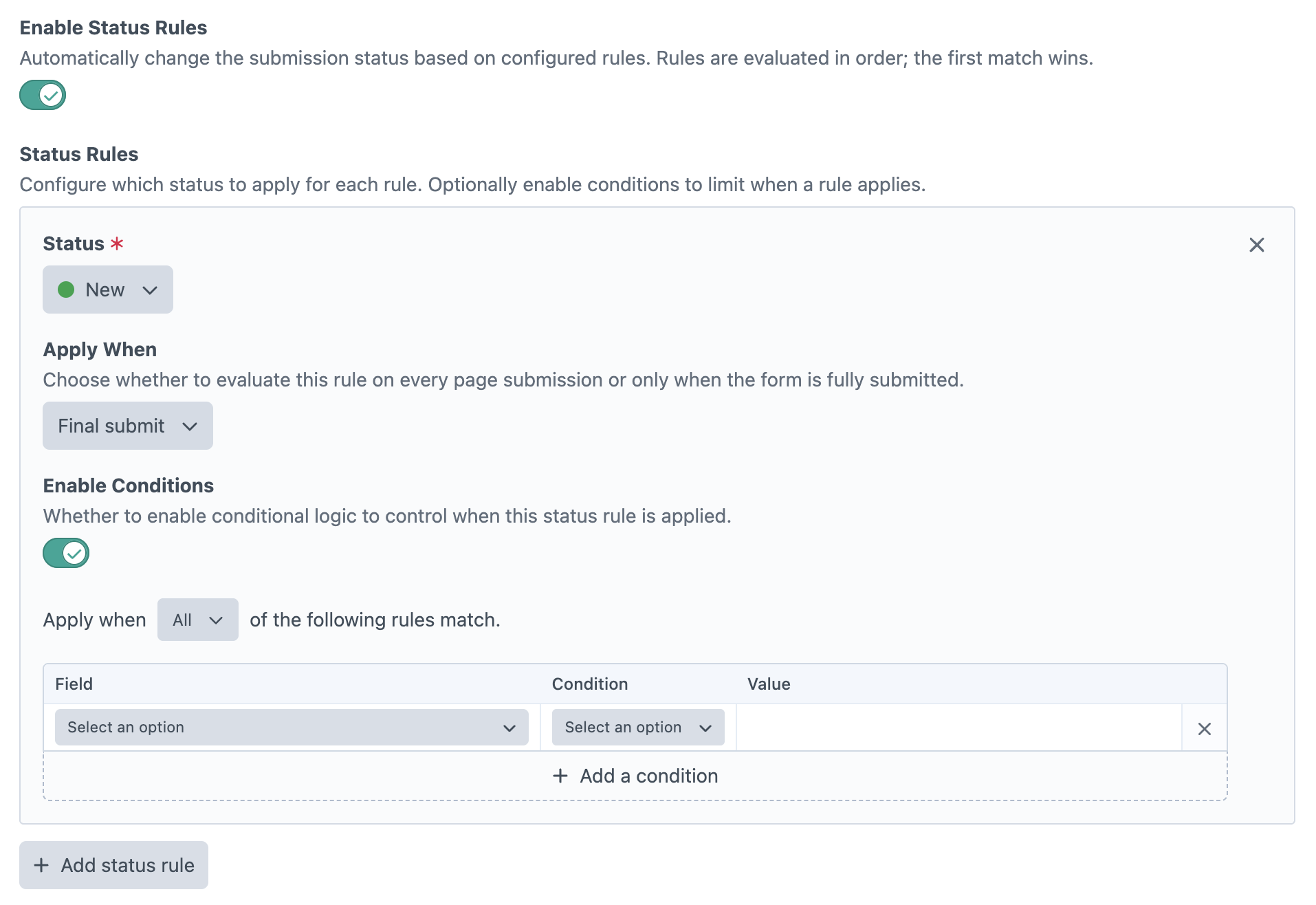
Submission statuses are more than labels now. Conditional status rules in the form builder let the front end assign a status based on field values during submission processing — useful for triage, moderation, and routing workflows without manual CP edits.
Conditional redirect rules under Behaviour → After Submit follow the same idea for thank-you pages. Match a rule, override the default submit action, send people somewhere more relevant.
Validation Messages That Make Sense
Formie 4 introduces a dedicated Validation tab on fields, plugin-wide default validation templates, and per-rule overrides for the validators people actually hit — required, unique, match field, text limits, blocked domains, file uploads, and more.
Validation copy now uses consistent {label} placeholders, and the front end respects your overrides through data-formie-validation-*-message attributes. Small thing, big difference when you're localising forms or trying to sound human instead of robotic.
Failed Notification Alerts
When an email notification fails to send, Formie can now alert specific user groups or additional addresses — similar to the failed integration alerts that arrived in Beta 6. Less silent failure, more "please check the queue before Monday."
Beta 5 — Dynamic Options And Better Fields
Beta 5 was one of the bigger feature betas — starting with expanding option-based fields like Dropdowns.
Option Sources
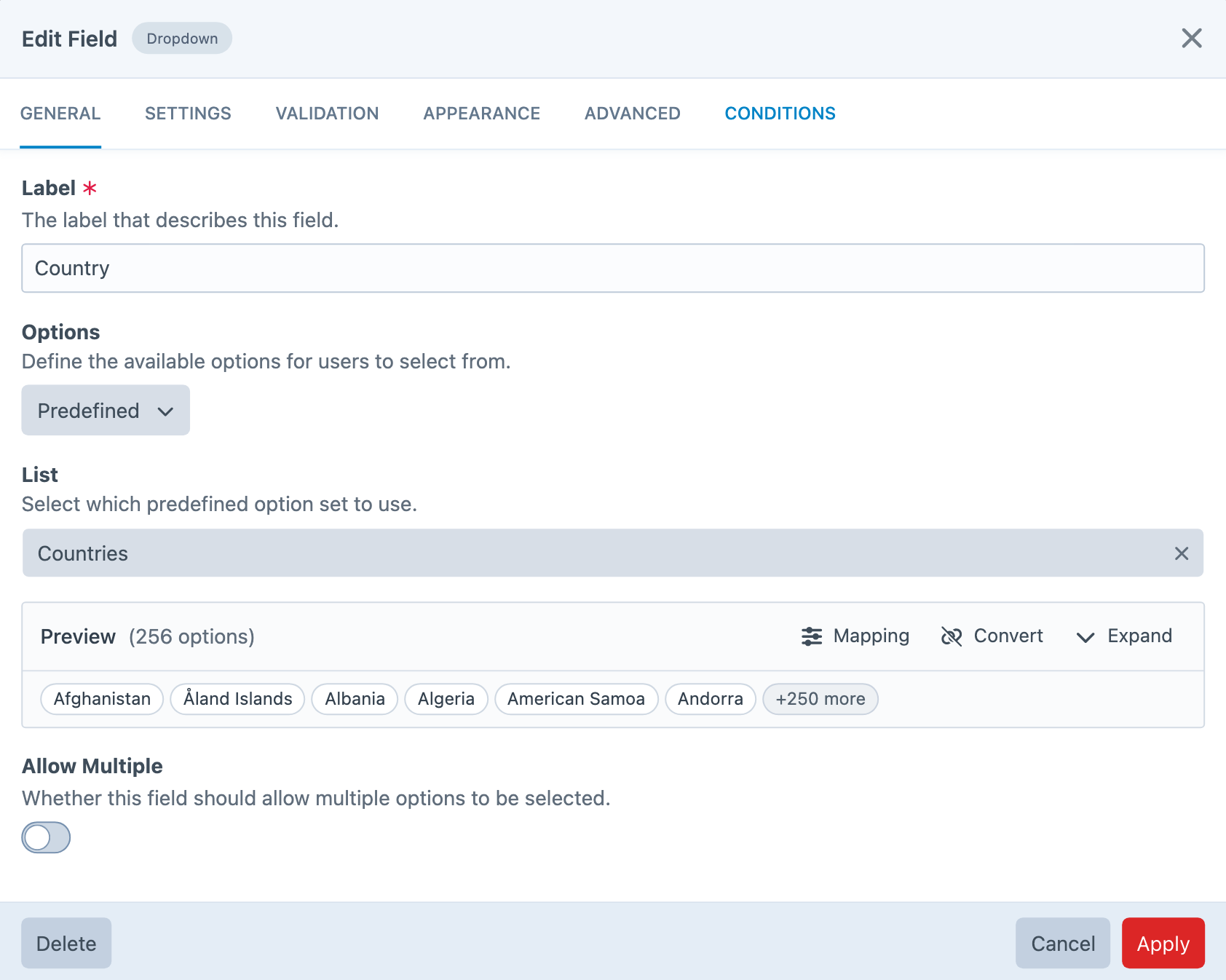
Dropdown, Radio, and Checkboxes fields now share an Option Source model:
- Static — manual options table, as before
- Predefined — countries, states, currencies, and the rest
- Integration — Mailchimp interests, HubSpot properties, Salesforce/Zoho/Dynamics picklists, and more
- Template — developer-supplied lists at render time
While Predefined options existed before, they were largely used to import into a static table. Now, they exist as properly dynamic options, with the ability to "detach" back to static options as before.
Recipients fields align with the same model, and searchable dropdowns are available when you have long option lists.
Address, Date, And Builder Polish
Address fields picked up smart State / Province behaviour, allowed countries, and optional IP-based country preselection. Date/Time fields gained Date Range collection in calendar mode, better validation on text and dropdown display types, and consistent formatting across notifications and exports.
On the builder side, Rich Text and HTML cosmetic fields, a syntax-highlighted HTML editor, Note fields for editor guidance, and Custom Field adapters (Link, Maps, and friends) round out the "field polish" work.
Beta 6 — Uploads And Integrations
Beta 6 paired two areas that show up together on real-world forms: files and third-party payloads.
Modern File Uploads
File Upload fields now have two Display Types:
- File Input (Simple) — native browser input; files upload on submit
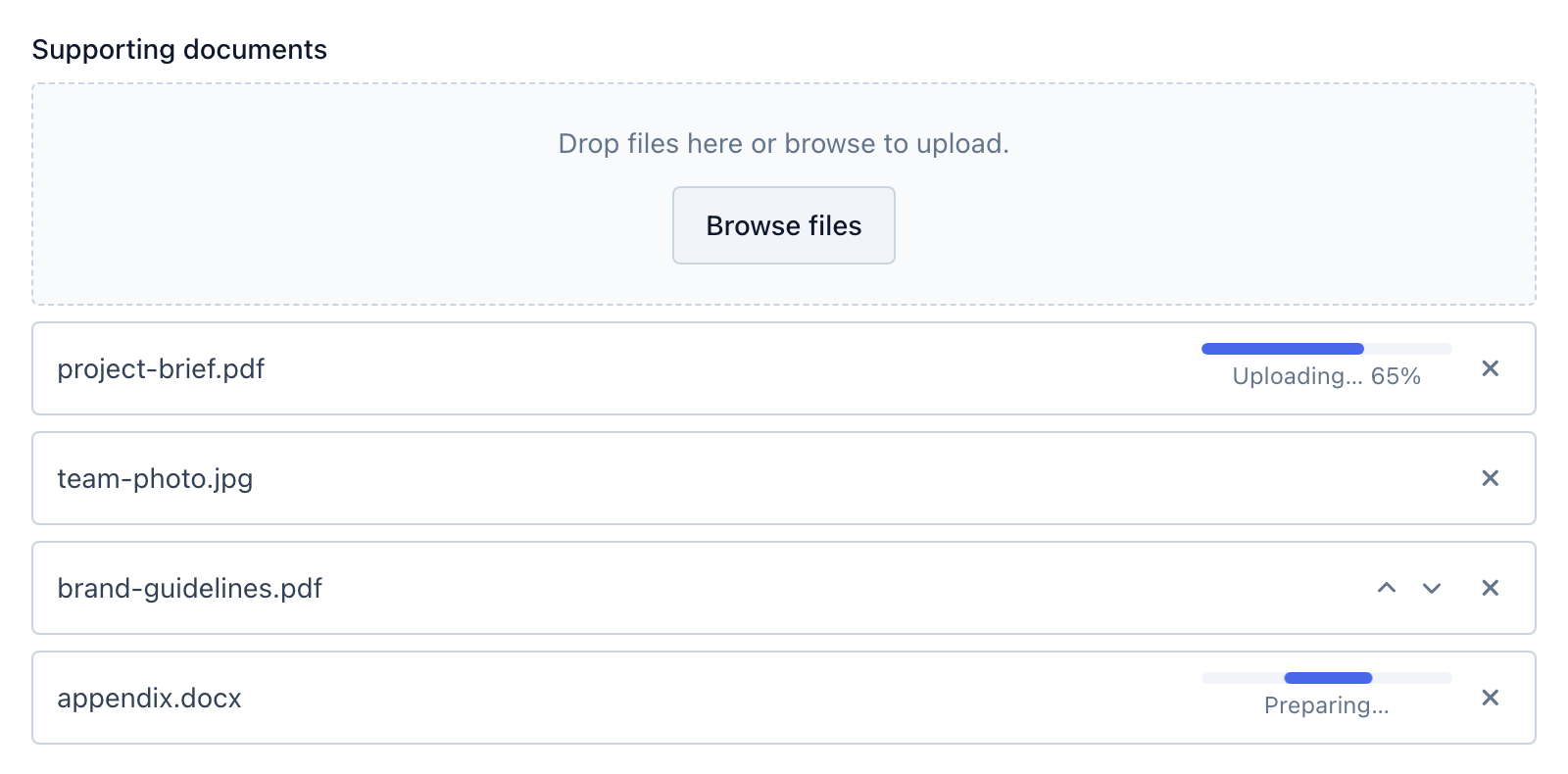
- Upload Manager (Advanced) — drag-and-drop, async staged uploads, progress, remove, and reorder
Existing forms default to Simple, so upgrades stay conservative. Advanced is there when you want immediate feedback or a richer UX. Per-field Asset Data Retention lets you delete uploaded assets after a configured period while keeping the submission record — handy for GDPR-conscious workflows.
Signature fields, multi-page upload persistence, repeater/group nested uploads, and GraphQL file upload paths were tightened in the same beta window.
Integrations, Rebuilt For Production
Integrations moved out of the settings basement — and out of the "ask a developer to change plugin settings" workflow. There is now a top-level Integrations control panel section where editors with the right permissions can connect, configure, and manage integrations themselves. Site-scoped integrations can be created and edited on production (allowAdminChanges = false) without project config deploys, which is the big win for teams where staging and live are separate worlds.
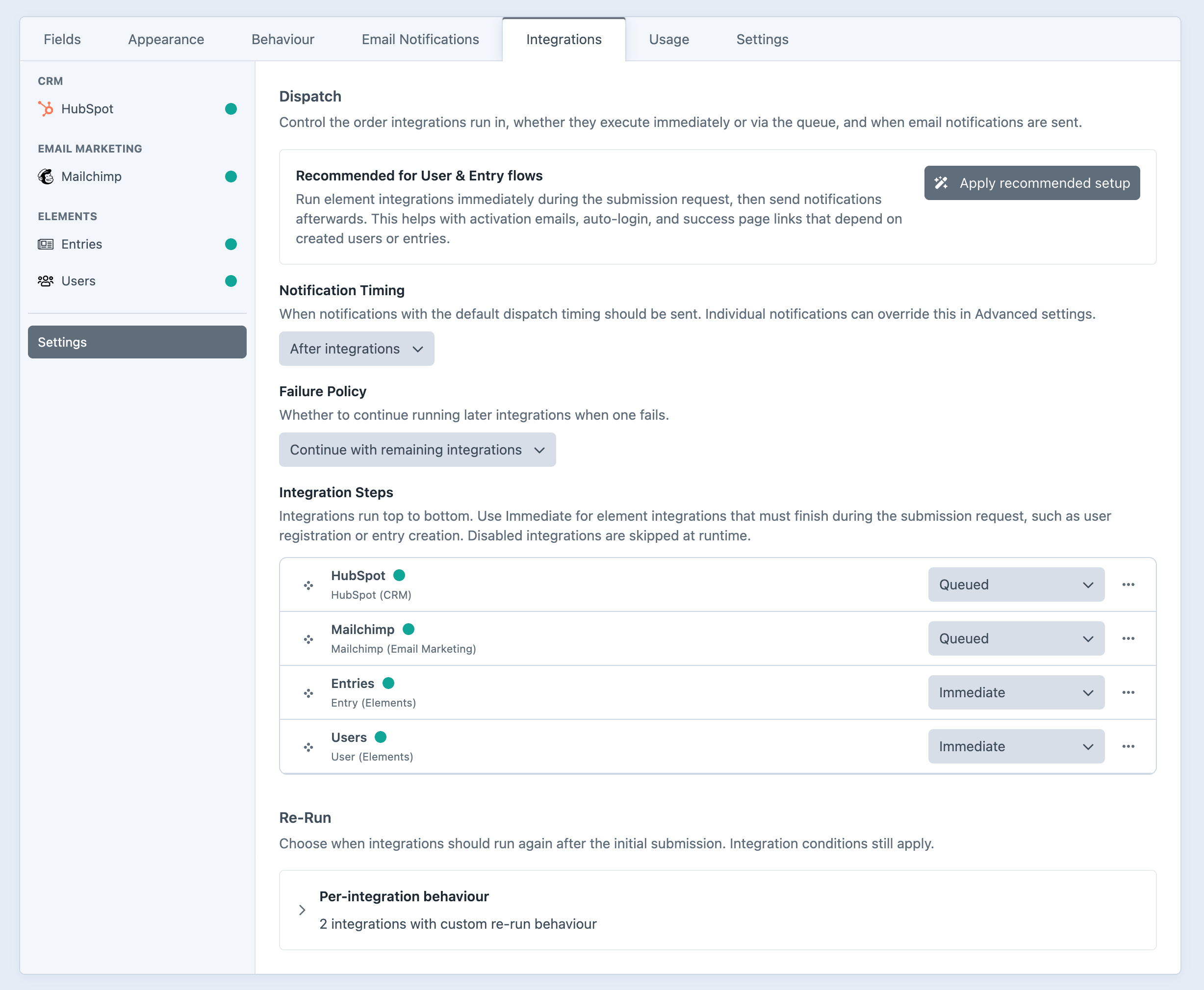
On top of that, the execution model is much clearer, with a dedicated Integration Settings panel in the form builder.
- Integration conditions — only run when field/status rules match
- Integration Dispatch — sequential vs queued execution, notification timing relative to integrations, and
{dispatch:handle:property}variables - Re-run policies — once on submit, on submission edit, on CP save, or custom triggers
- Failed integration alerts — email when a payload integration fails outside the queue
Beta 7 — Security, Permissions, And Reports
4.0.0-beta.7 closes out the first half of the Formie 4 beta with three areas — spam and captcha controls, better user permissions, and all-new submission reporting.
Spam Protection And Captcha Controls
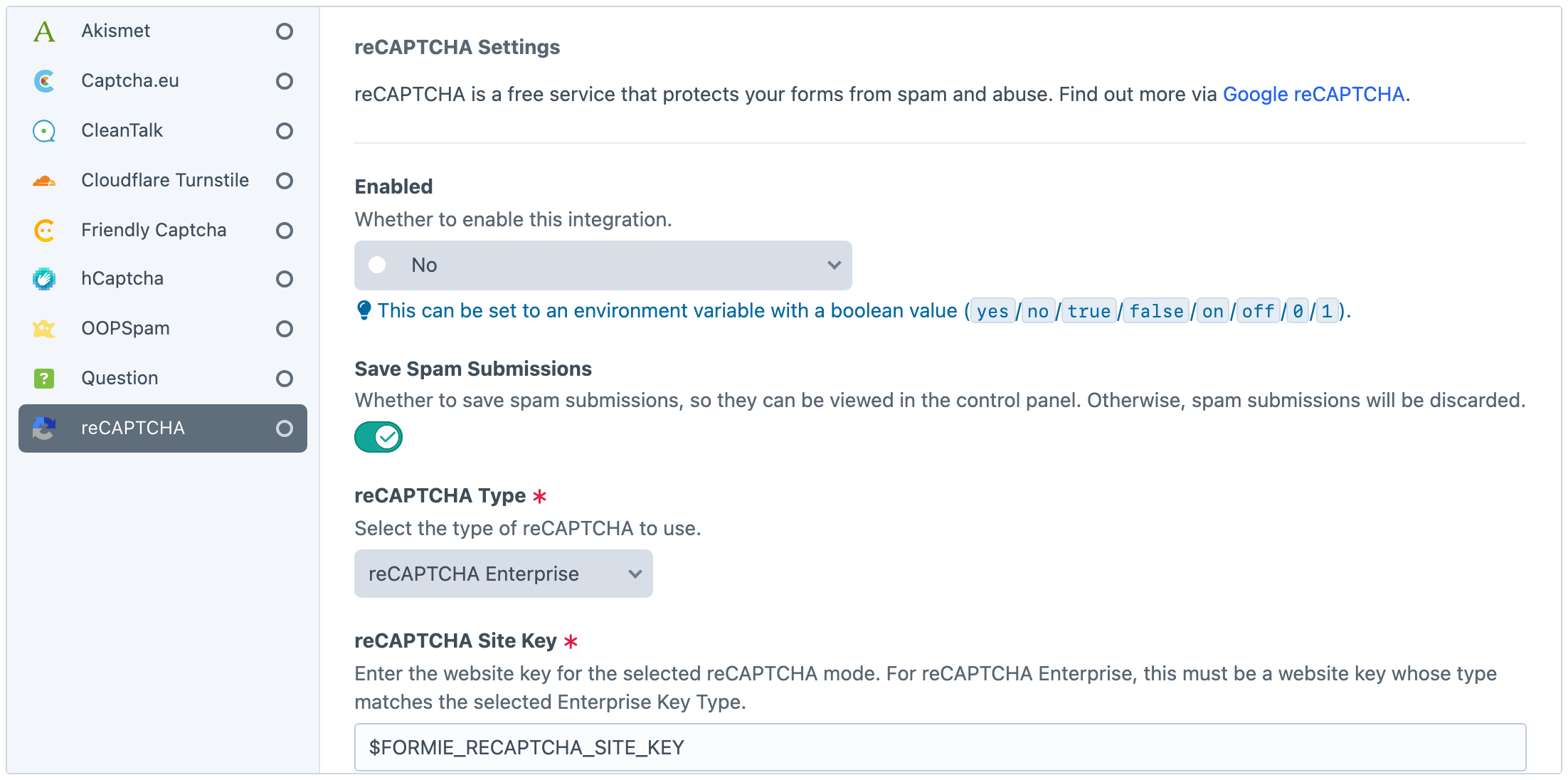
Captcha provider credentials and spam handling settings no longer live in plugin settings or project config. They are stored separately, per site where needed — so API keys stay out of YAML, and production teams can manage captcha and spam rules without a deploy.
Settings → Spam Protection brings spam handling, keyword rules, captcha credentials, and abuse controls into one place. The old built-in Honeypot, Javascript, and Duplicate captcha types are gone — but their behaviour lives on as submission guards: passive checks (honeypot field, minimum submit time, replay protection) that run before third-party captchas and keyword screening.
You'll also find suspicious text detection, link screening, global throttling, and per-IP throttling here. Per-form Submission Limits (cap all submissions, per IP, or per logged-in user) sit alongside those global controls, with clearer UX so entry caps aren't confused with flood protection.
reCAPTCHA Enterprise, Turnstile, Friendly Captcha, and score-based modes received beta hardening too — multipage mounting, CSP nonces, and per-form action/score overrides where needed.
Better User Permissions
Formie 4 tightens up who can see and do what — useful when content editors should manage their own forms without access to everything:
- Permissions scoped to form groups, so teams only see the forms they need
- Optional per-form permissions when one form needs tighter control
- Granular access to individual settings pages
- Separate permissions for integrations, import/export, and reports
Form groups can also define allowed submission statuses, optional per-group field palettes, and new-form default profiles — so a "Support Team" group and a "Marketing Team" group can start from different stencils, templates, and defaults.
If your project relies on restricted editor accounts, this beta is worth a look.
Reports — A New Way To Understand Submissions
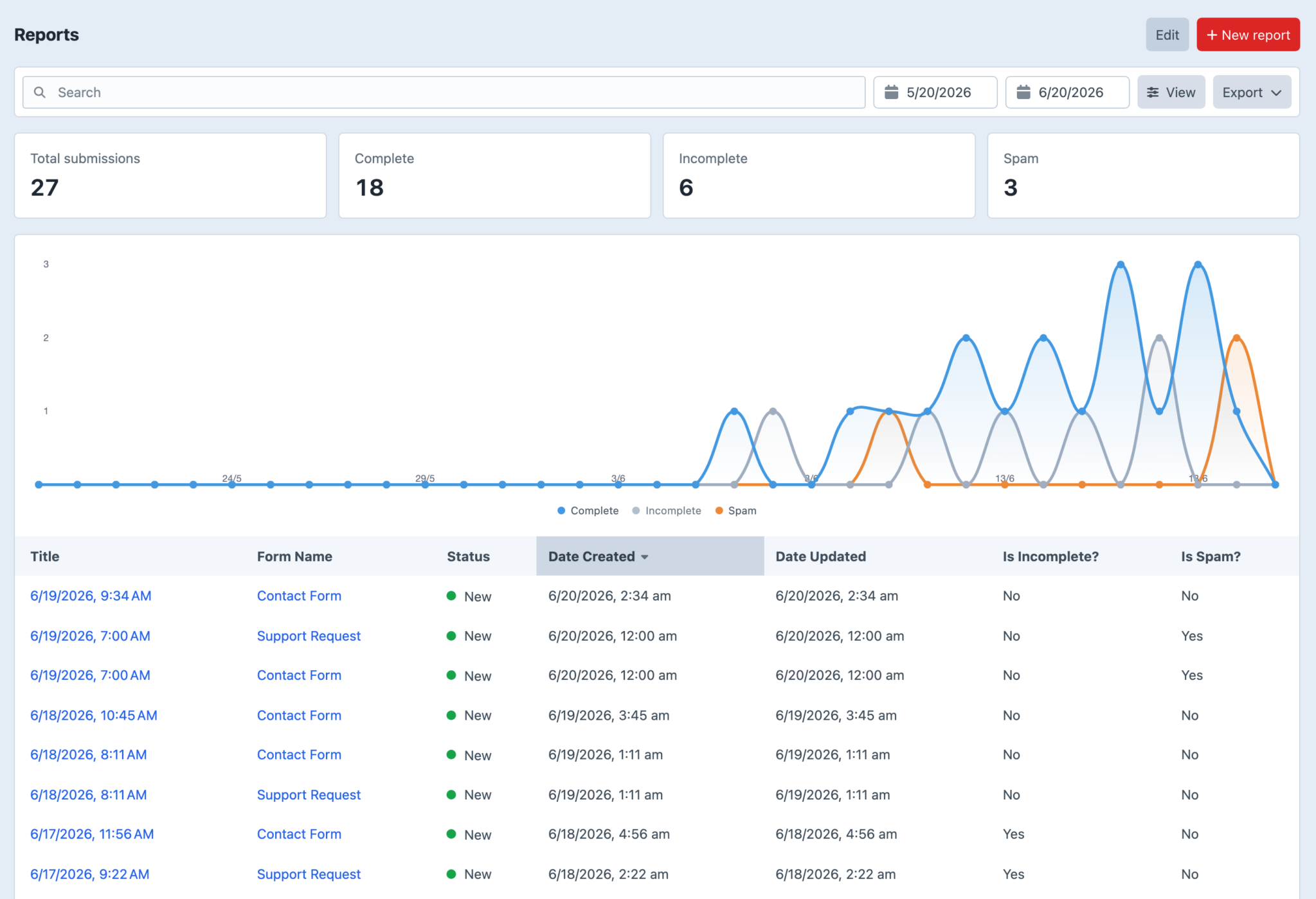
The submissions index is great for operational work — review, edit, change status, delete. It is less great when you want to answer "how many enquiries did we get last week, broken down by form, excluding spam?" without exporting by hand and opening a spreadsheet. On-demand export now lives in Reports rather than the submissions index.
Reports is a new top-level control panel section for saved analytical views:
- Filters — forms, date windows, complete/incomplete/spam, statuses
- Summary counts — totals and per-form breakdowns
- Charts — submission trends over time
- Export — CSV, Excel, JSON, XML, or text download with configurable columns, field handles, label vs value display, and column order
- Scheduled delivery — email a summary with an export attachment (CSV, Excel, JSON, XML, or text) on a daily/weekly schedule
Reports are project-config synced definitions with a shared query engine — export and scheduled email are outputs of a report, not three separate features duct-taped together.
Scheduled delivery requires ./craft formie/reports/run-scheduled on a cron schedule (for example, hourly). Deliveries will not send automatically until that command is scheduled on your server.
See the Reports and Scheduled reports docs for setup detail.
What About Beta 2?
Ah, nothing gets past you does it? Beta 2 was a small stability release — front-end build fixes and an event naming correction after Beta 1 shipped. No blog post required, and you're not missing a secret feature drop.
What's Still Coming?
Formie 4 is not done yet. We've got a few more things up our sleeve, including:
- Surveys, Polls, and Quizzes
- Payments and commerce-adjacent improvements
- Localization, multi-site, and headless/API
The full frontend package story also deserves more room than a mid-beta roundup can give it — we'll cover React, Vue, Web Components, and headless rendering properly at launch.
How To Try It
Follow the Formie 4 Beta upgrade guide for full instructions.
- Back up your database and project files.
- Test on a local, staging, or disposable copy of the site.
- Install the beta with Composer
composer require verbb/formie:"^4.0.0-beta.7" - Run migrations.
- Walk through the areas above that match your project — especially uploads, integrations, spam controls, permissions, and reports if those are part of your workflow.
- Send us anything weird.
You can report issues on GitHub (opens new window), or get in touch through Verbb support.
Onward to Formie 4.