

Comments was one of the very first plugins we ever made, back in March 2015, and 11 years later we've rebuilt it from the ground up for Comments 4, covering everything your visitors see and write as well as the way your team looks after it.
There's an all-new front end with rich replies, mentions and attachments that plays nicely with full-page caching, plus React, Vue and web component packages if you'd rather build your own. Your team gets a moderation queue that says why each comment is waiting and a place to keep track of every commenter, from your trusted regulars to the one or two who need watching.
A Whole New Front End
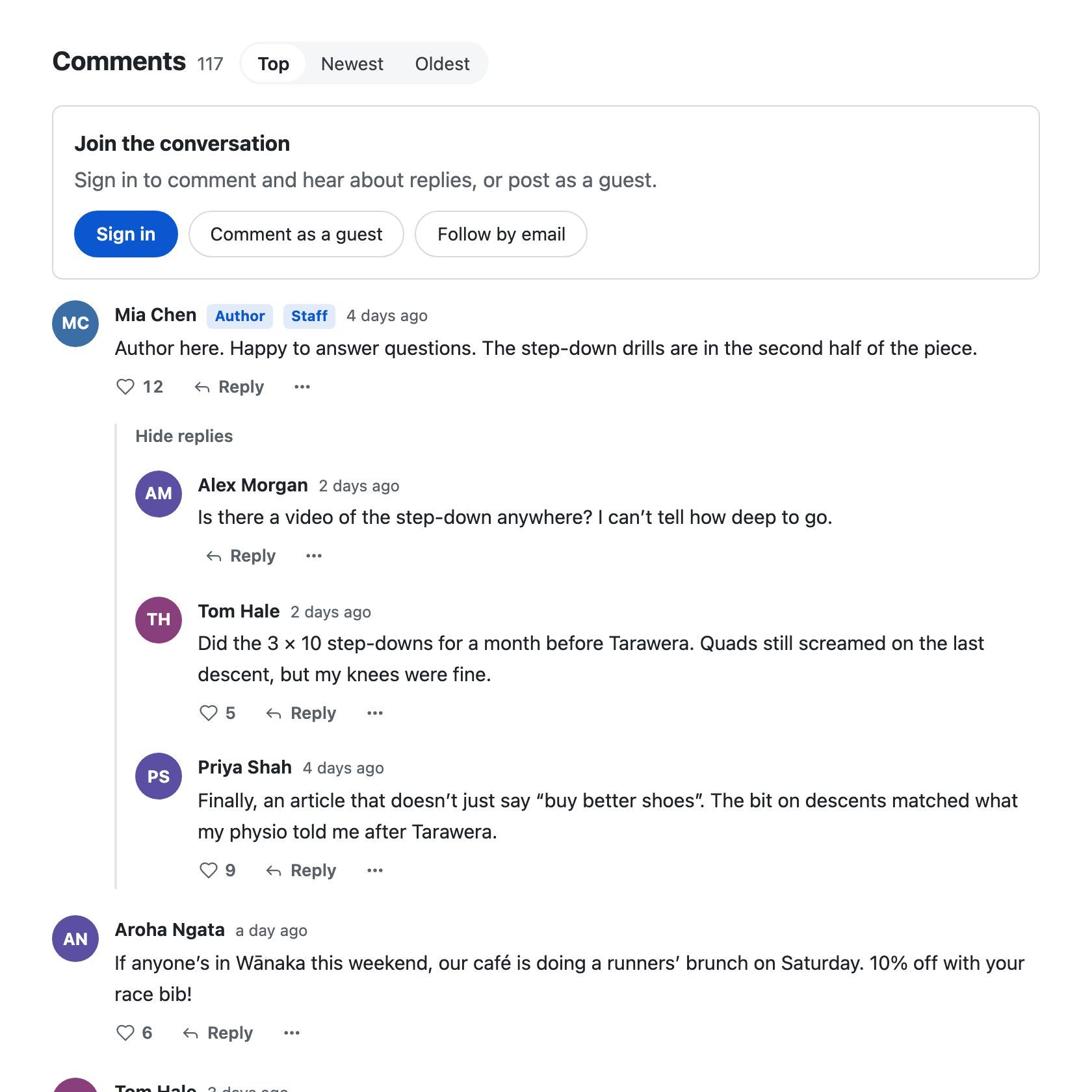
Everything your visitors see in Comments 4 is new, from the design and the CSS behind it to the JavaScript that runs it and the API it talks to. Comments 3 built comments into the page on the server, along with each visitor's form and votes, which made a page with comments awkward to cache. Comments 4 works the way most comment systems on the web do, Disqus, Giscus and Hyvor among them. The page holds a light placeholder with the comment count, and the comments load from a JSON data API once a visitor scrolls near them (or presses a Show comments button, if you'd prefer). Because the page holds nothing about the person viewing it, a full-page cache or CDN can serve the same copy to everyone, and someone who never scrolls that far never loads the comments at all.
On the page, the editor sits at the top and says who you're posting as, guests get a clear choice between signing in and commenting as a guest, and the actions on each comment stay out of the way until you need them. It comes in light, dark and automatic themes, with Author and Staff badges so readers can spot your writers and your team.
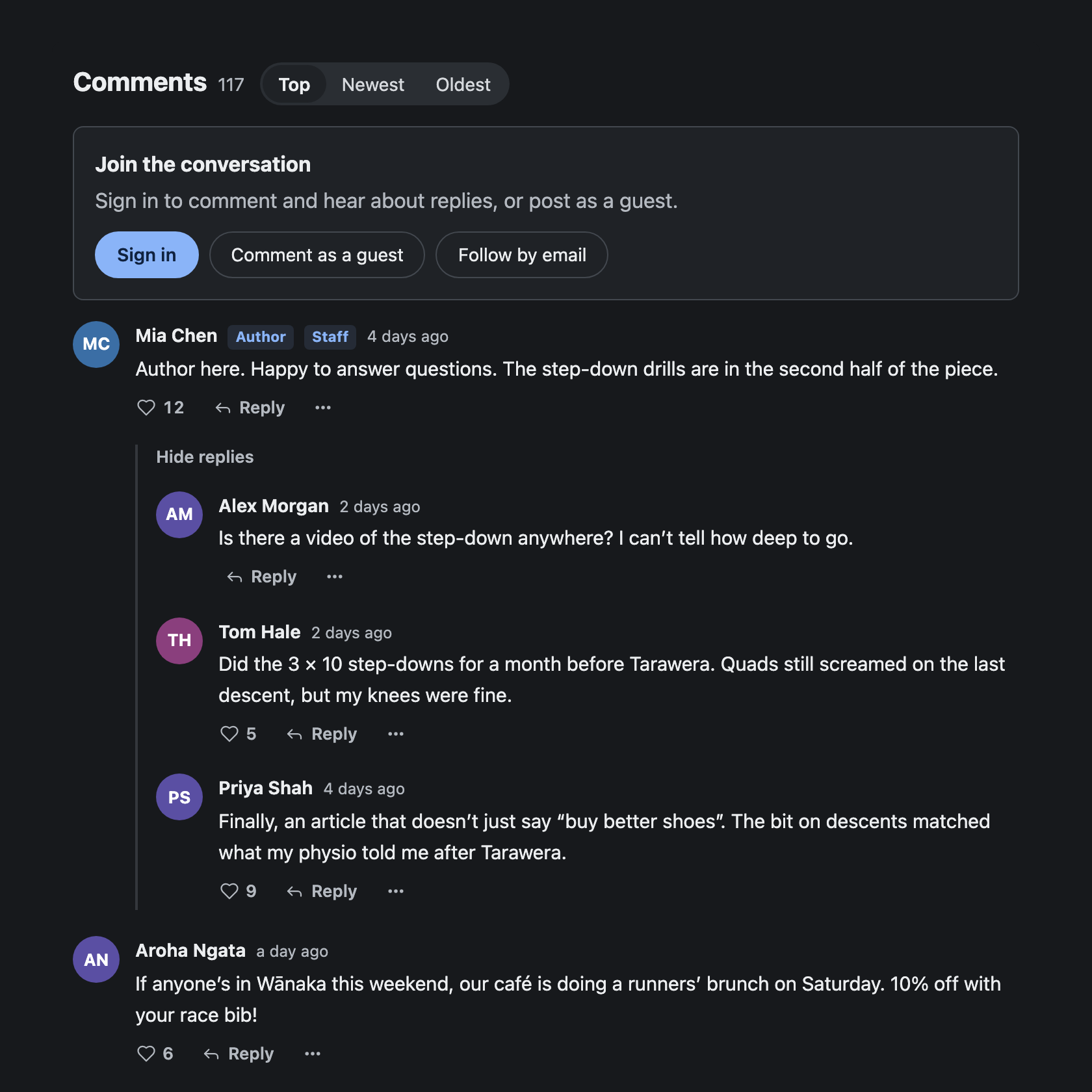
Restyling starts with themes and CSS variables for colours, fonts and spacing, and the theming guide is where we'd start. You can add your design system's classes too, and when you need different markup, you can replace individual parts and keep everything else.
React, Vue and Your Own Front End
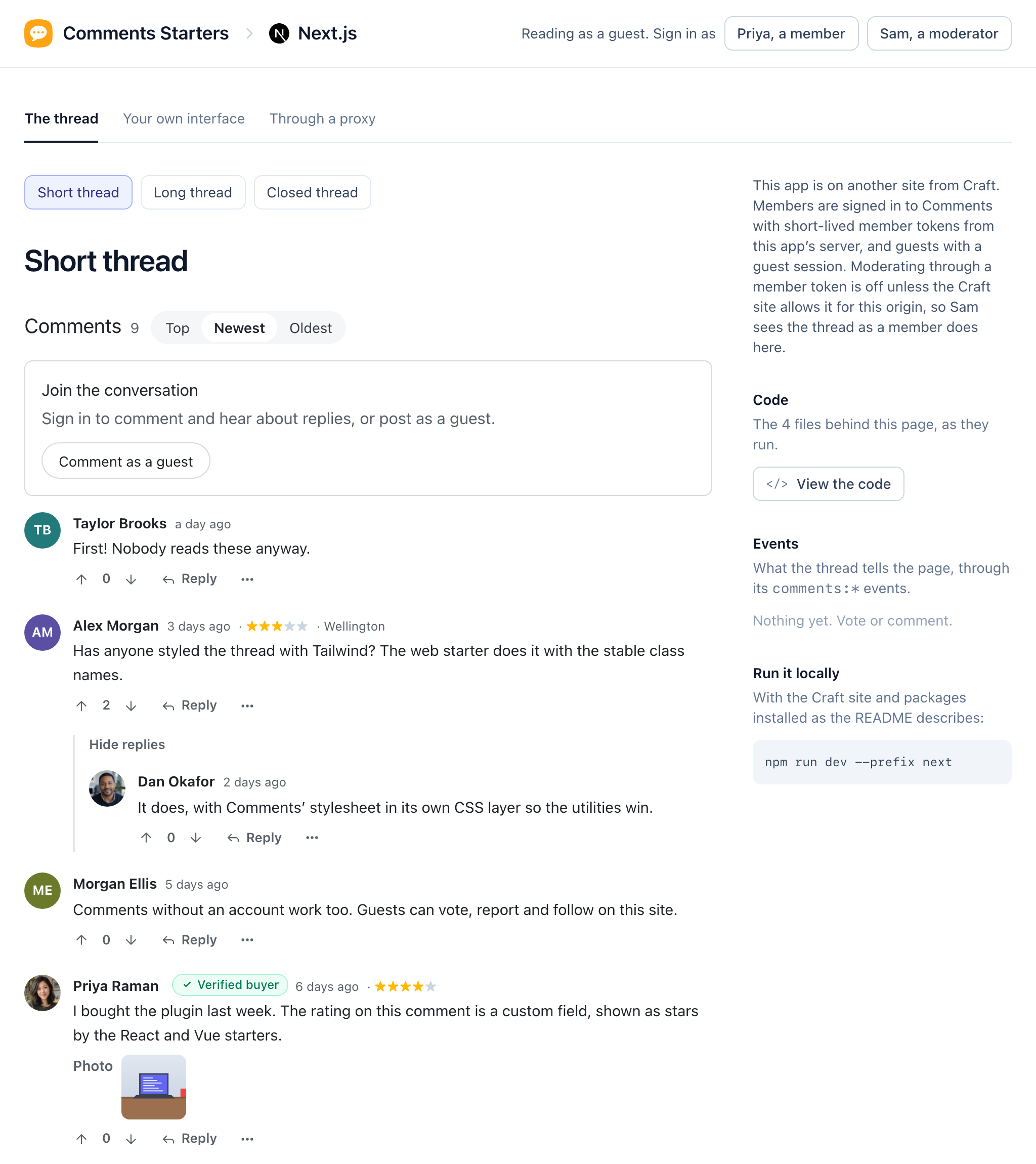
Because comments load from the data API, they don't need Craft's templates at all. Your front end can sit on the same domain as Craft, on a subdomain or on another site entirely, and members can still sign in and comment through whichever of the front-end packages (opens new window) suits it.
- @verbb/comments-react (opens new window) puts comments in React apps, including Next.js, with a
<CommentsThread>component and hooks for building your own interface. - @verbb/comments-vue (opens new window) does the same for Vue 3 apps, including Nuxt.
- @verbb/comments-web-components (opens new window) adds comments to any page with a single
<verbb-comments>element, for static sites and pages Craft doesn't render. - @verbb/comments-browser (opens new window) is the same script Craft's own pages run, if you'd rather bundle it into your own build.
- @verbb/comments-core (opens new window) is the data layer under all of them, for a completely custom interface or for reading comments on a server.
The quickest way to see what that looks like is the Comments starters (opens new window), a set of small working sites. For Craft-rendered pages there's the default single line of Twig, plus Sprig, Turbo and Datastar versions that keep comments working as those libraries swap the page around. The framework starters cover React, Vue and web components with Vite, Next.js on another domain and Nuxt on a subdomain of the Craft site. Some add their own touches, like a "Verified buyer" badge drawn by a React component and star ratings from a custom field, and the code for all of them (opens new window) is on GitHub.
Writing Comments
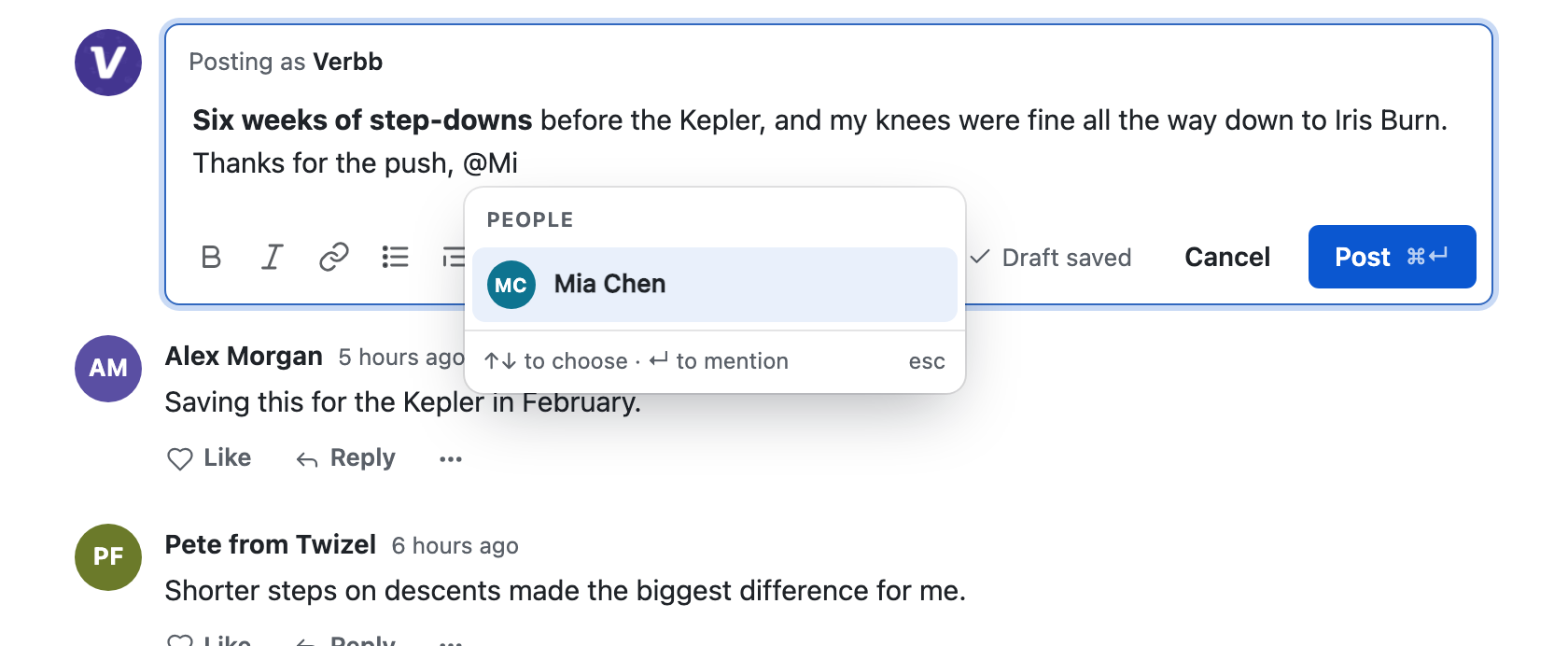
The comment form now uses Editor (opens new window), our new open-source rich text editor, so people can add lists, quotes and links and mention someone in the discussion, and signed-in commenters can attach images and files, saved to a volume of your choosing. Editor only loads once a visitor starts writing, so readers who never comment never load it. An unsent reply is kept as a draft, so an accidentally closed tab doesn't take a long reply with it. The rich authoring docs explain each option.
Moderating Comments
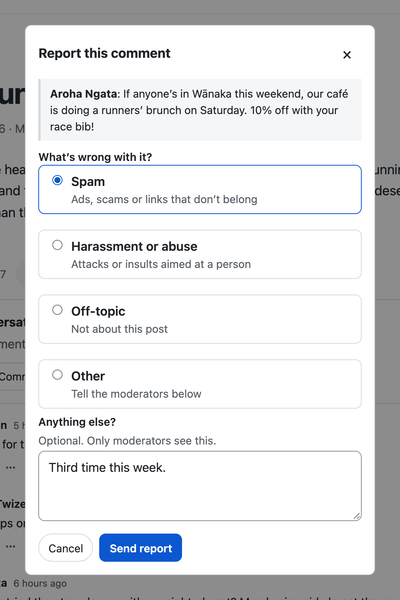
When a visitor reports a comment, the dialog quotes it so there's no doubt which one they mean, and asks for a reason and an optional note.
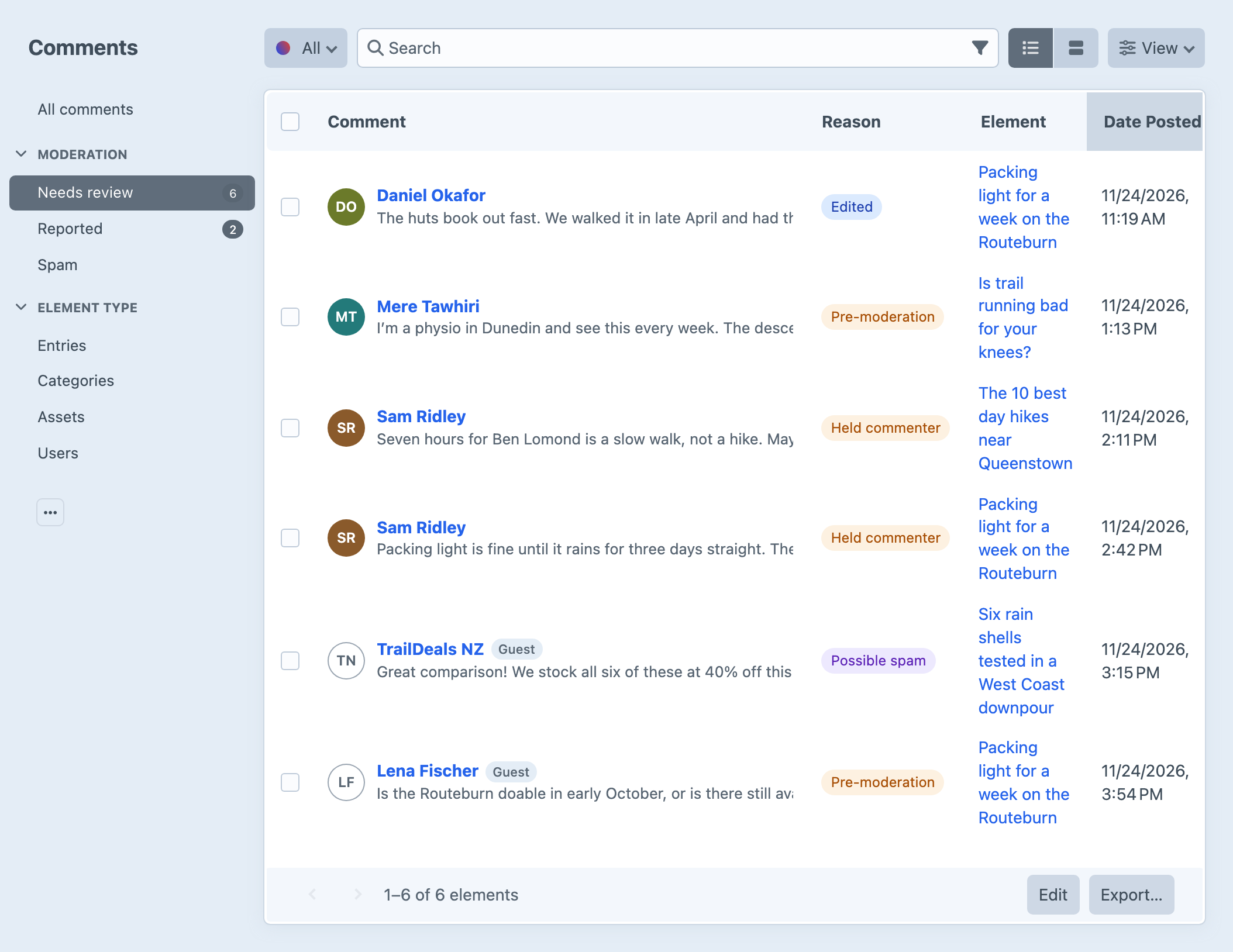
Reports land in the Comments index alongside everything else that's waiting. Needs review, Reported and Spam sit at the top, a count in the main navigation tells you something's waiting before you've even clicked through, and a Reason column says why each comment is there, such as pre-moderation, a held commenter or possible spam.
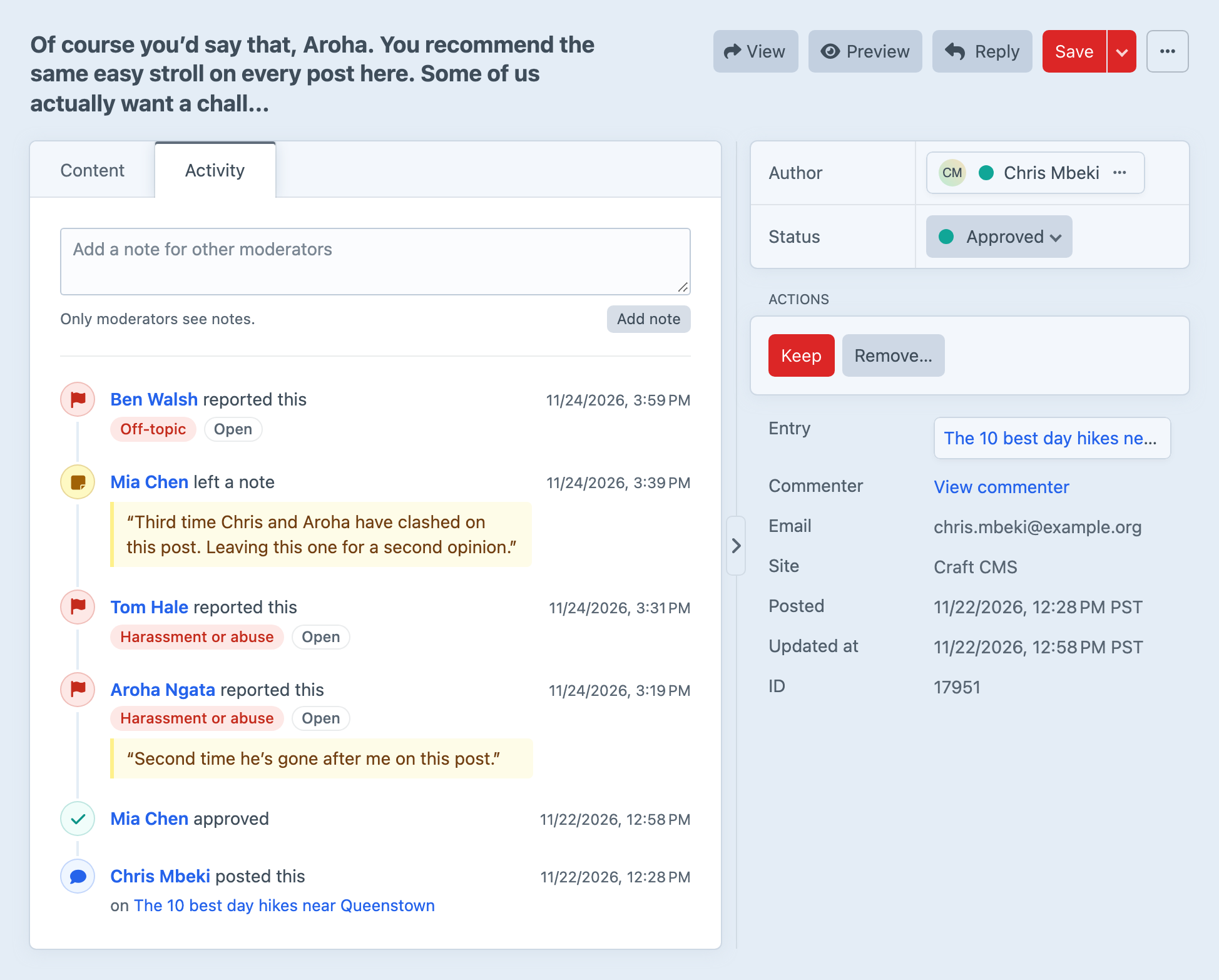
Each comment opens in Craft's own element editor, slideouts included, with a notice at the top saying why it's waiting or what it was reported for. Approve, Spam and Remove (or Keep and Remove for a reported comment) sit in the sidebar, and removing asks for a reason, with room for a private note. You can also reply from the control panel, and your reply goes up straight away with the same notifications as a reply on the site. Bulk actions approve, keep, remove or mark comments as spam, and none of them delete anything permanently, so a comment removed by mistake can be brought back.
When a comment needs more than one look, its Activity tab shows everything that's happened to it, newest first, from when it was posted to who approved or reported it and why, along with any notes moderators have left for each other.
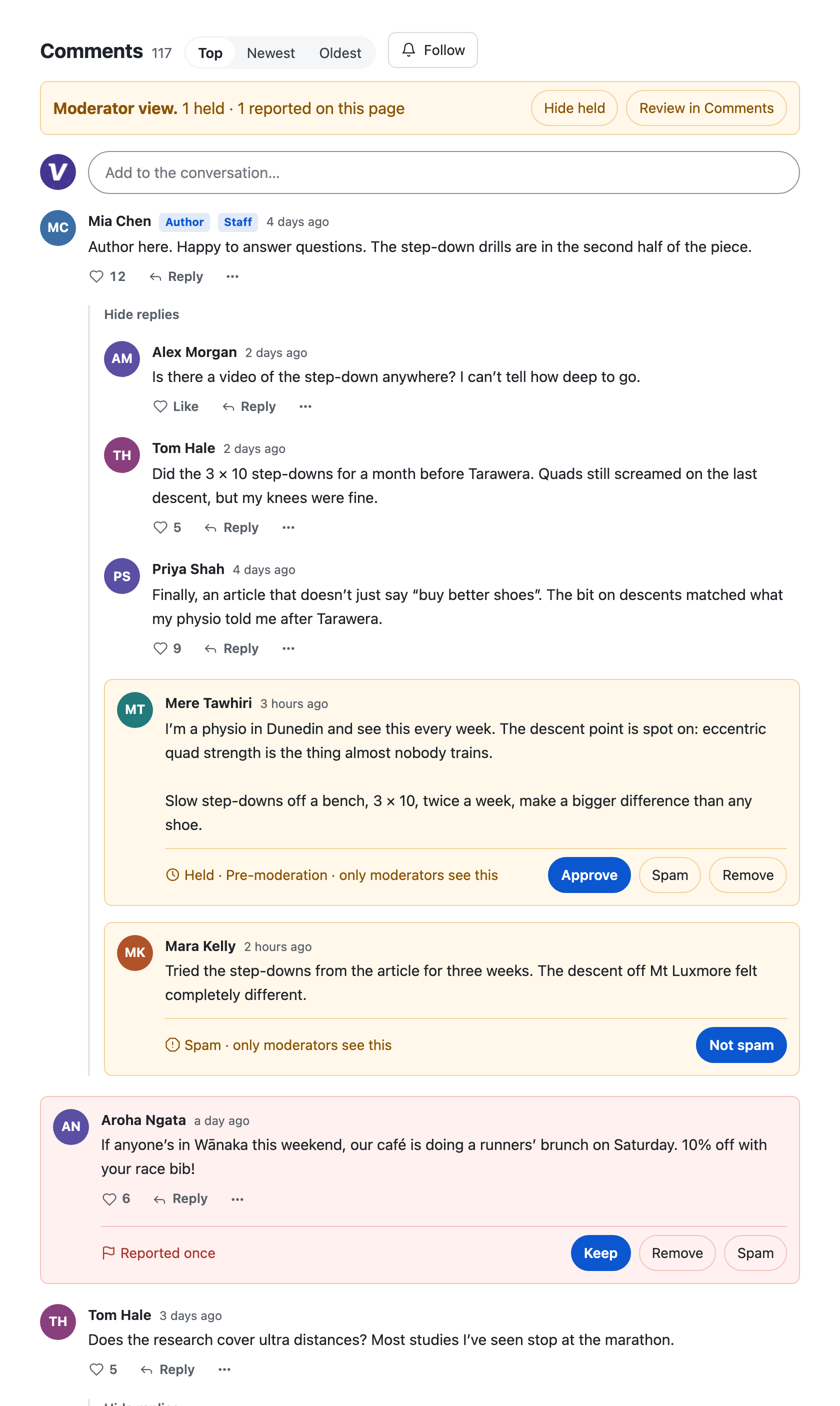
Sometimes it's quicker to deal with a comment while you're reading the article. When you're signed in as a moderator, the comments show how many are waiting on that page, and held and reported comments appear in full, with buttons to approve, keep or remove them right there.
Editors can look after an entry's comments from the entry, too. The Comments field lets each entry follow the section's default or open, close or turn off its comments, and shows any comments waiting there, the latest replies and how many people are following. Closing comments keeps the conversation visible while stopping new ones, which works nicely for older posts. The moderation docs go through each decision and what it changes on the site.
Commenters and Review Settings
Most sites have a group of regulars who never cause any trouble, and one or two people who reliably do. The new Commenters area lists everyone who's commented, with or without an account, along with how many comments they've written, how many are waiting and how many were removed.
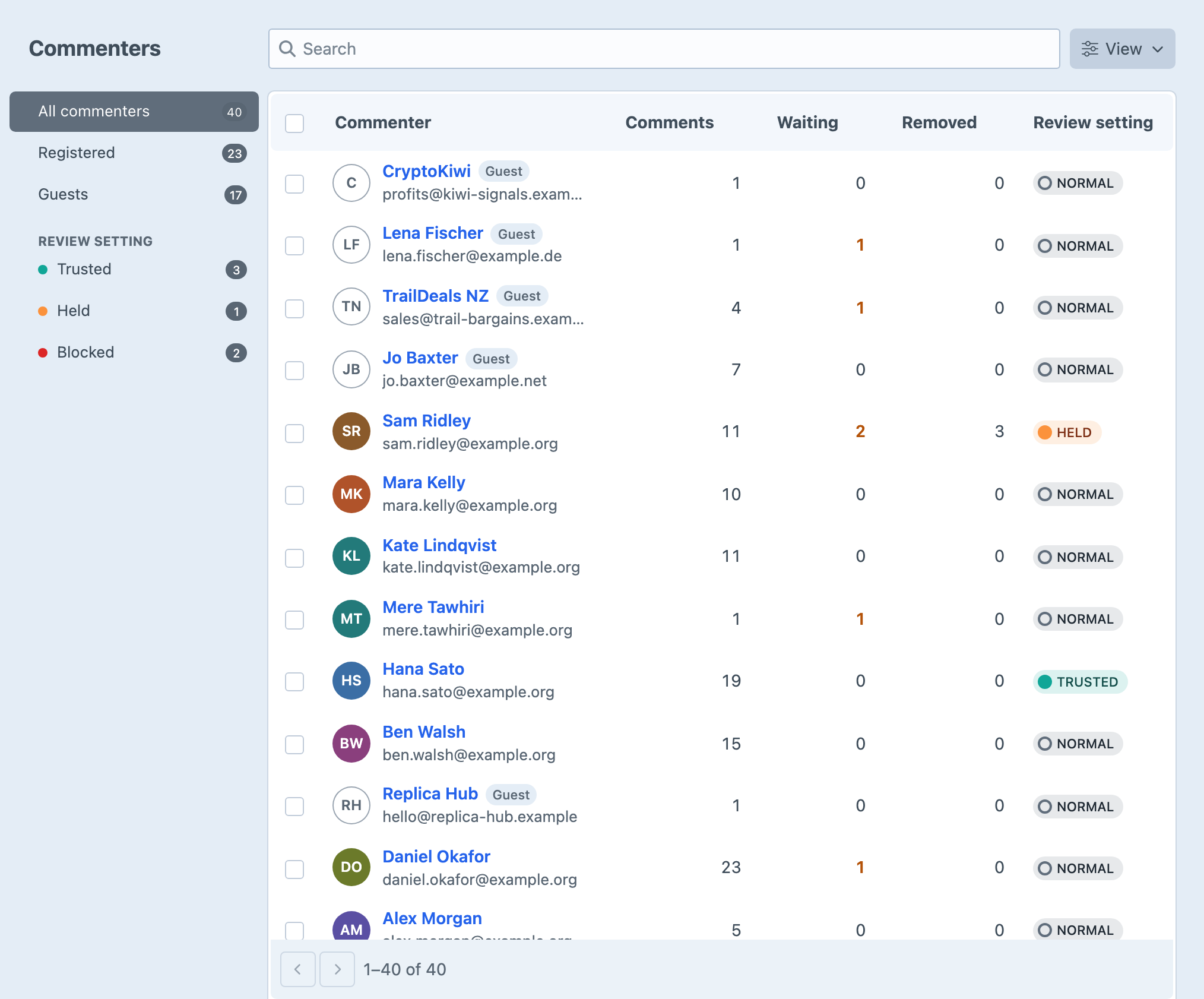
Each commenter has a review setting, so if you hold every comment for review, marking your regulars as Trusted saves them waiting every time they post. Held sends one person's comments through review, and Blocked stops them posting, voting, reporting or following altogether. Trusted isn't a free pass, mind you, because spam checks and your keyword filters still apply to everyone. Each person also has their own page with their comments, their review setting and its history.
Spam Protection
Spam checks come from Protect, Editor's open-source sibling, and every form gets a randomised honeypot, a minimum form time, single-use submissions and rate limits, with Cloudflare Turnstile, reCAPTCHA v3 or Akismet on top. A caught comment shows what each check found, so it's easy to tell a genuine catch from a false positive, and if you mark it as not spam, it goes back for review and Akismet is told it got that one wrong.
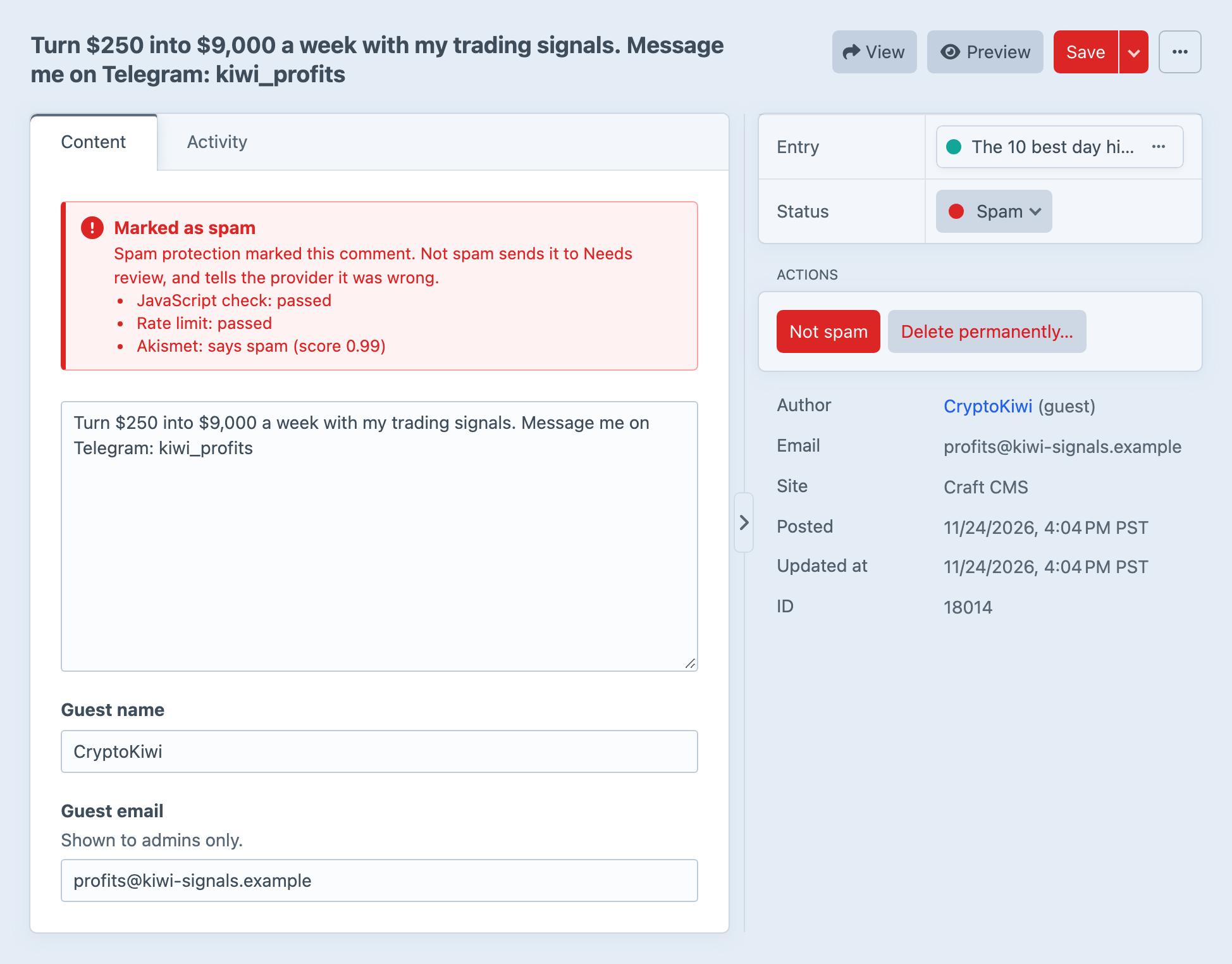
The spam protection docs cover each check and provider in more detail. We pulled Editor and Protect out as their own free packages, so you can use them in your own plugins and modules too.
Notifications and Emails
Notifications work the way they did in Comments 3, with a few welcome additions. Mentions get their own email, and every email about a discussion now has a one-click unsubscribe that works without signing in, for members and guests alike. Guests can follow a discussion too, or tick a box to hear about replies, once they've confirmed their email address — so nobody can sign someone else up just by typing in their address.
Staff emails work as before, with your moderators hearing about comments waiting for review and your list of addresses hearing about new and reported ones, except that nobody is emailed about their own comment or report now. If your site already has its own way of reaching people, every email has an event you can use to swap it for your own delivery, or to add something like an in-app notice alongside it. The notifications docs have all the details.
Extras
- Likes, up and down votes, or neither, with a Top sort that ranks comments by votes.
- Links to a comment reach it wherever it is, even a few pages in or under a collapsed reply.
- People without a photo get their initials on a colour, and developers can add their own badges, such as "Verified buyer".
- An Author Edit Window limits how long people can edit or delete their own comments, and anything changed gets an "Edited" label.
- Custom fields on the comment form can be collected privately for moderators, or collected and shown on the comment.
- Start Closed on the Comments field keeps comments closed on each entry until an editor opens them, for sites where comments are opt-in.
- A global
Commentsobject andcomments:*browser events let your own scripts load comments and react to new ones. - GraphQL gets more comment data and a
moderateCommentmutation. - Console commands check your comments and rebuild their counts.
Upgrading from Comments 3
Comments 4 is a major release with breaking changes to templates, settings, GraphQL and the PHP API, and it needs Craft 5.10 or later. The upgrade moves everything across in batches and checks it all arrived before removing anything. Afterwards, an Upgrade Report lists anything that needs your attention, such as overridden templates or retired settings, and the upgrade guide covers the rest.
Get Comments 4
Comments 4 (opens new window) is available now for Craft 5.10 and later, and it brings Editor and Protect along with it. The changelog has the full list of changes. Here's to the next 11 years.