Overview
Control Panel Nav lets you organise the Craft control panel sidebar around the work your editors do. You can rename, reorder, and hide menu items, then add links and dividers to help people find what they need. Layouts let you provide different menus for different user groups.
Install Control Panel Nav, then sign in to the control panel as an administrator and open Control Panel Nav. You need administrator access to manage navigation and layouts.
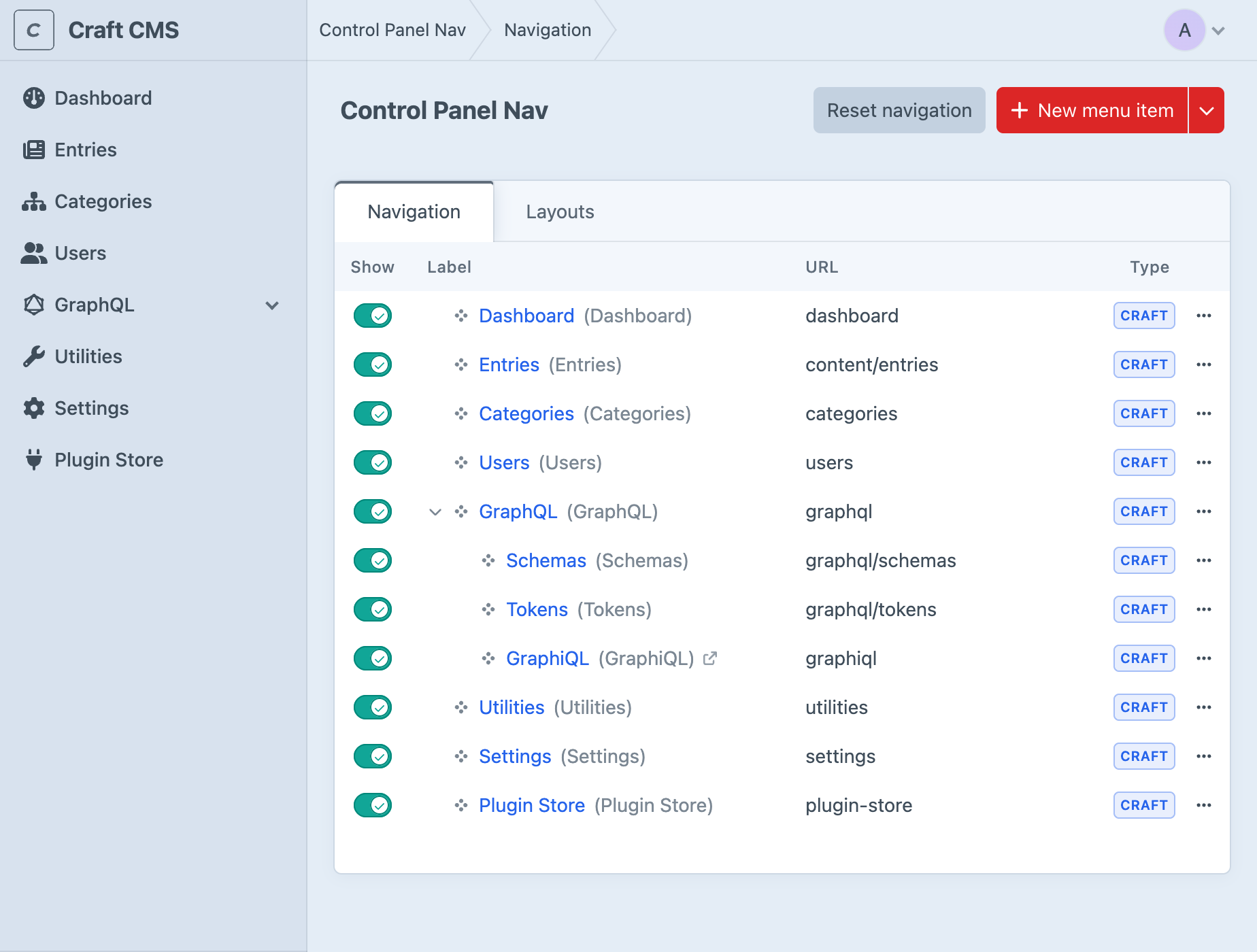
Organising Your First Menu
Suppose your editors frequently open Entries and need a link to your team's handbook. Start in the Navigation tab. If you have multiple layouts, choose the layout you want to edit from the picker in the header. Otherwise, you're editing the default layout.
Drag Entries beside the other tools your editors use most often. To change its name, click its label, enter the name your team uses, and click Save. The destination stays the same.
Choose New menu item, enter Team Handbook as the Label, and enter your handbook's full URL, such as https://handbook.example.com. Click Save, then drag the new link into position. The example address is a placeholder; use a page your team can access.
Reload the control panel and check the sidebar. The renamed Entries item should still open Entries, and Team Handbook should open your chosen page. If you're editing a group-specific layout, also check it while signed in as someone from that group. Layouts explains how assignments and priority affect which menu they see.
Saving Changes
Reordering items and changing Show save as you go. Creating or editing an item opens a form: click Save to apply that form's changes, or Cancel to discard the draft. Deleting an item and resetting navigation apply when you confirm the action. There is no separate page-wide save step for the navigation builder.
Saved layout and navigation changes are stored in Craft's Project Config. If your project deploys Project Config between environments, make these changes in your development environment and include them in your usual deployment process.
Choosing What Editors See
Navigation covers renaming, nesting, visibility, and resetting a layout. Add Manual Items for destinations outside the existing menu and Dividers to separate groups of links. To use your own SVG icons, first follow Configuration.
Craft and plugin menu items still depend on the signed-in person's permissions. Hiding an item changes the menu; it doesn't prevent someone from visiting a page they have permission to access. Likewise, showing an item doesn't grant access. Configure access in Craft's user permissions and use layouts to organise the links people need.