Interactions
Interactions let visitors react to a comment without writing a reply. Choose how under Comments → Settings → Interactions, or with the interactionMode setting.
| Interaction Mode | Setting Value | What Visitors See |
|---|---|---|
| None | none | No reactions. |
| Likes (upvote only) | like | A Like button with a count. This is the default. |
| Upvotes and downvotes | updown | Upvote and Downvote buttons with their counts, and a net score. |
Each person has one reaction per comment. Pressing the same button again takes it back, and pressing the other button switches to it. Only approved comments can be voted on. Voting stops while a discussion is closed, whether by the element's Comments field, Close Comments Globally or Auto-close Comments, and the votes it already has stay as they are. Commenters with the Blocked review setting can't vote.
Voting needs an account unless you turn on Allow Guest Interactions. A guest's vote is tied to a cookie in their browser, so someone who clears it could vote again. Votes are limited to 60 a minute for each person, which is counted per user for signed-in visitors and per IP address for guests. Check Client IP Addresses if your site is behind a proxy, so that guests don't share a limit.
Author Scores
Turn on Show Author Score to show each signed-in author's total votes across their approved comments beside their name, such as +12: their upvotes or likes, less their downvotes. Guests don't have one. It's off by default.
Folding Comments Away
Hide After Downvotes, with upvotes and downvotes, and Hide After Reports, under reporting, fold a comment away once it has that many downvotes or open reports. The thread shows the comment's author and date with a short note, such as “Comment hidden due to low rating”, and a Show comment button in place of its text, so readers can still choose to read it. A folded comment stays published, and one folded for its reports still waits for a moderator under Reported. Once a moderator settles enough of its reports, it unfolds. Both are off by default.
Sorting by Votes
While interactions are on, the sort menu above the comments offers Top, which ranks comments by score, alongside Newest and Oldest. You can make it the initial order with craft.comments.render():
{{ craft.comments.render(entry, { sort: 'top' }) }}For a list of the votes someone has made, see Finding User Votes.
Reporting a Comment
Visitors can also ask a moderator to look at a comment. Report… in a comment's menu opens Report this comment, which quotes the comment and asks what's wrong with it, from your Report Reasons. Nothing is chosen until the visitor picks a reason, and they can add anything else in an optional box that only moderators see.
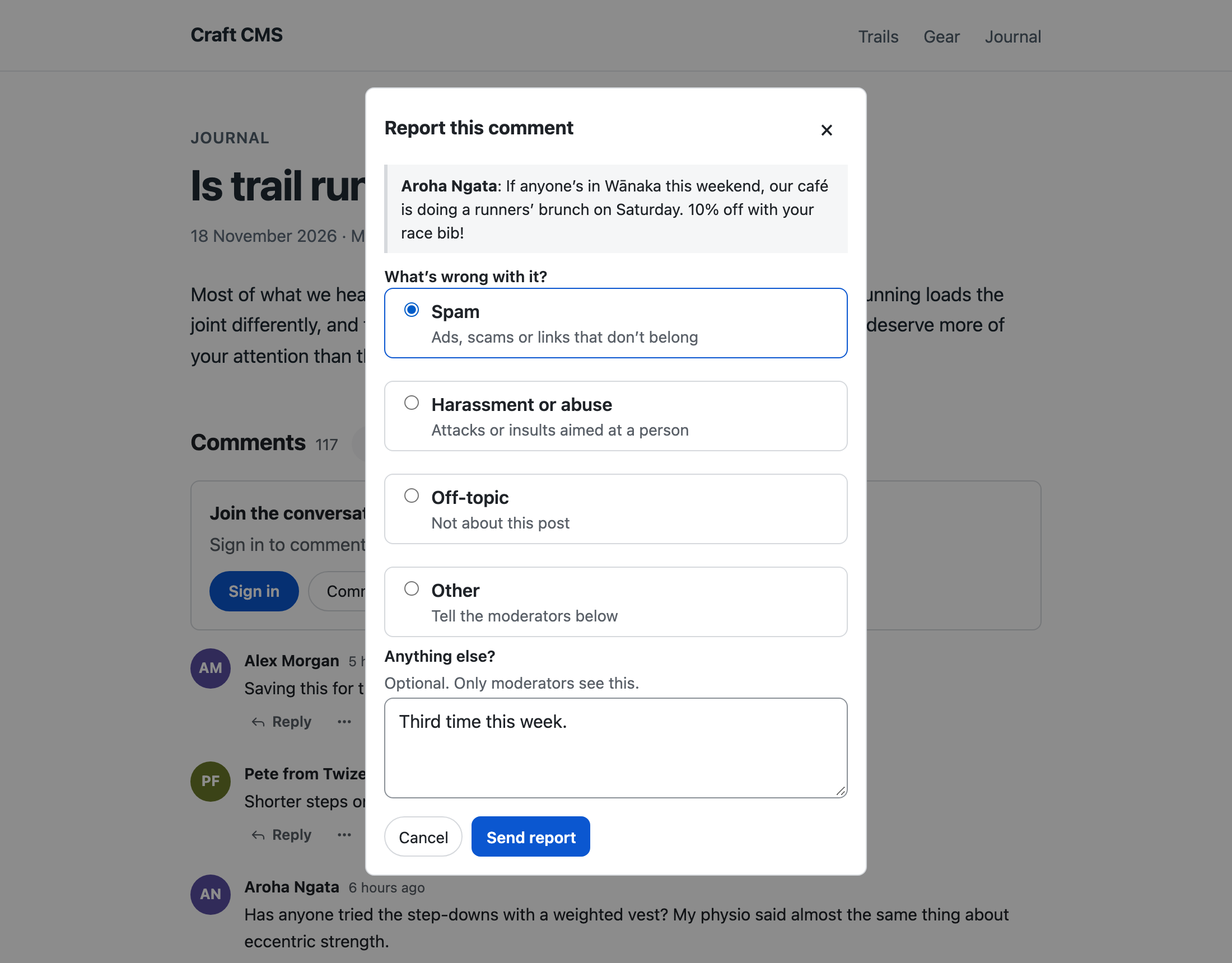
Signed-in visitors can report comments while Allow Reporting is on, which it is by default, and Allow Guest Reports extends that to guests. Set both, and the reasons, under Comments → Settings → Interactions. Only approved comments can be reported, and reporting the same comment again withdraws that person's report. Reporting stays open while a discussion is closed, so visitors can still point out a harmful comment, and blocked commenters can't report. Reports are limited to 3 every 10 minutes for each person, counted the same way as votes.
A reported comment stays on the site until a moderator decides what to do with it. Moderation explains how moderators work through reports.